
✅ Send and receive messages with hotels directly from the booking details.
✅ Attach and share documents such as vouchers, guest lists, and special requests.
✅ Receive real-time notifications when a hotel responds.
✅ Track all interactions in a structured conversation history.
🚀 Objective: Ensure efficient and structured communication with hotels for better booking management and reduced response time.
Accessing the hotel messaging system
To send a message or attach a document related to a booking:
- Go to "My Bookings" in the KOOB dashboard.
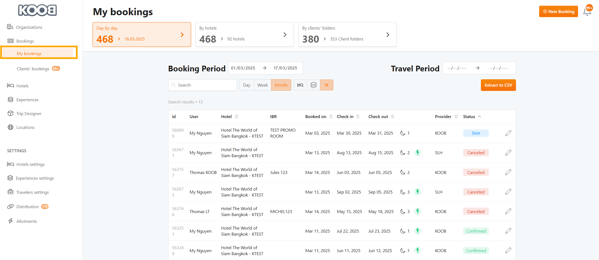
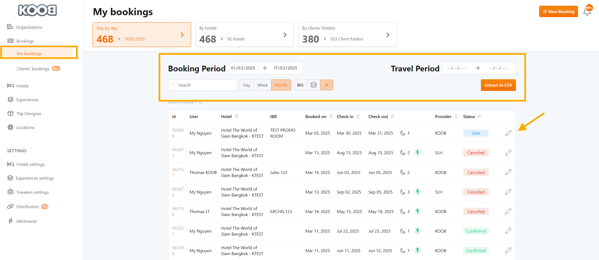
- Find the hotel booking you want to communicate about.
- Click on the pencil icon to open the booking details.
- Navigate to the "Chat" tab (for messages) or "Documents" tab (for attachments).
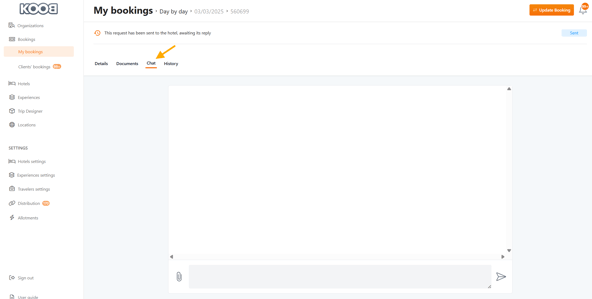
📌 Tip: You can also access the messaging system by clicking on a notification when a hotel sends a reply.
Sending a message to the hotel
To send a message to the hotel:
- Open the Chat tab in the booking details.
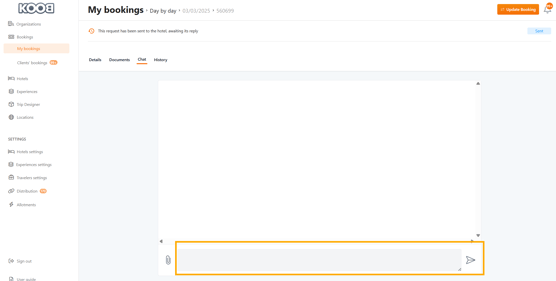
- Type your message in the text box.
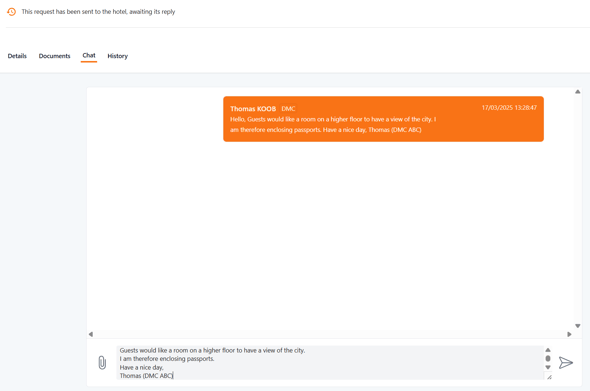
- If needed, click "Attach Document" to include a file (see next section).
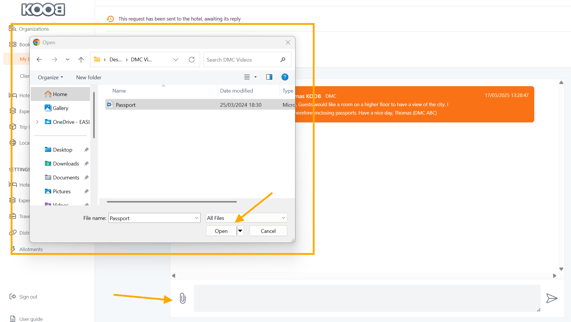
- Click the "Send Message" button.
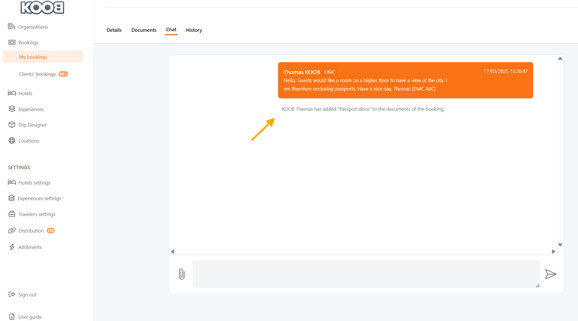
Sending & receiving documents
To send a document to the hotel:
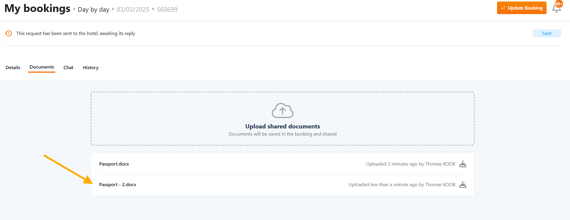
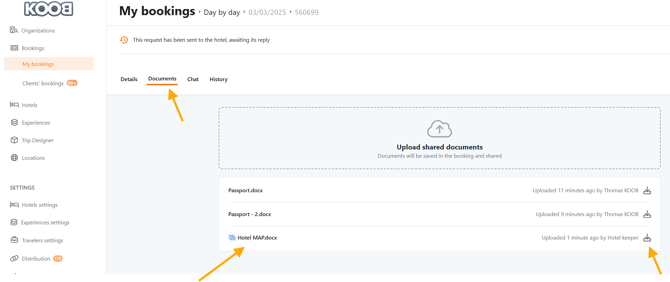
- Open the Documents tab in the booking details.
- Click "Upload Document".
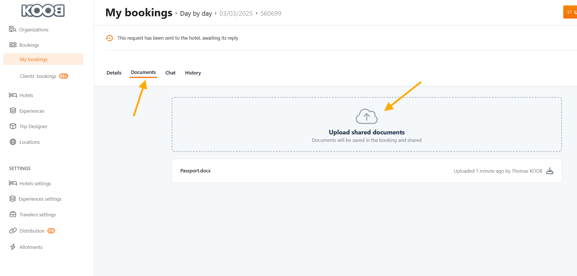
- Select the file type (PDF, Word, Excel, Image, etc.).
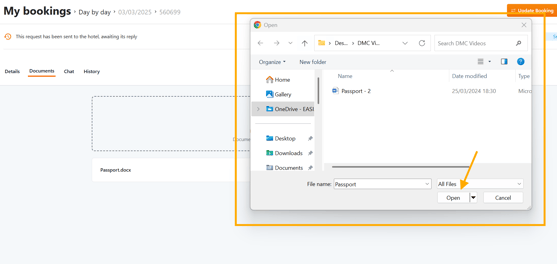
- Click the "Send" button.
What happens on the hotel side ?
- The hotel receives an email notification.
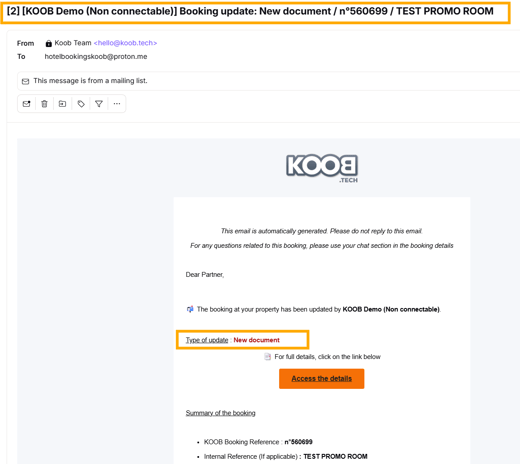
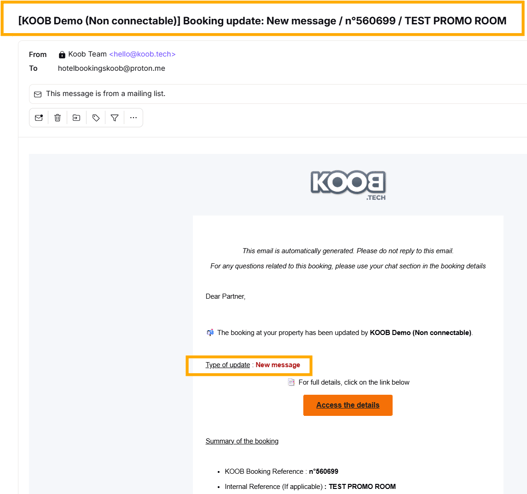
- The hotel clicks on the link.
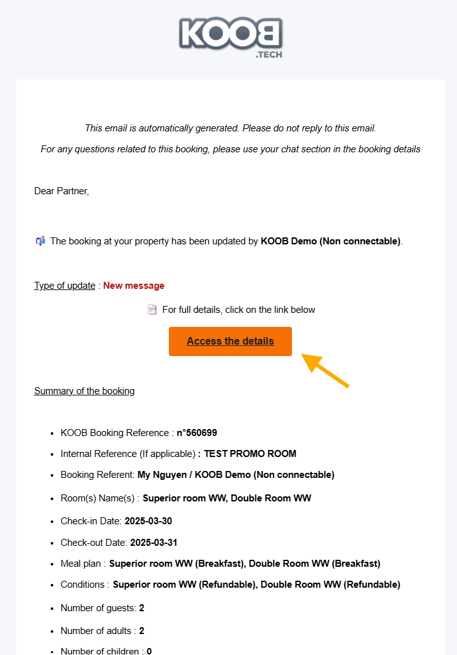
- The hotel accesses the message and the document, which it can download or view.
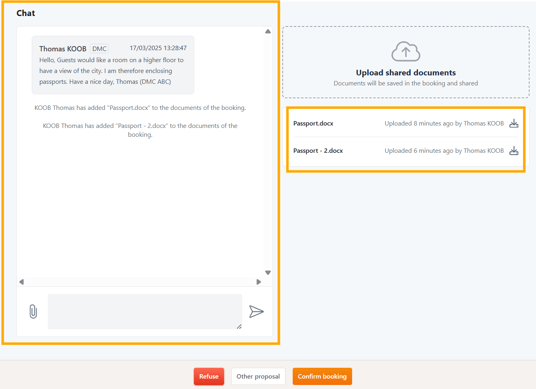
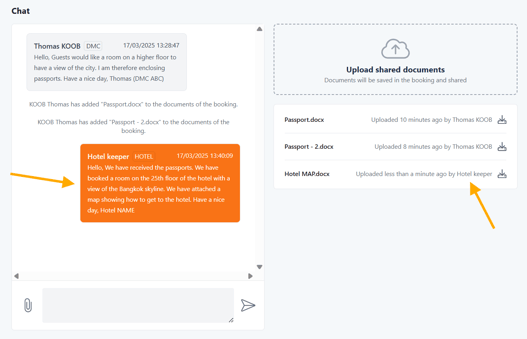
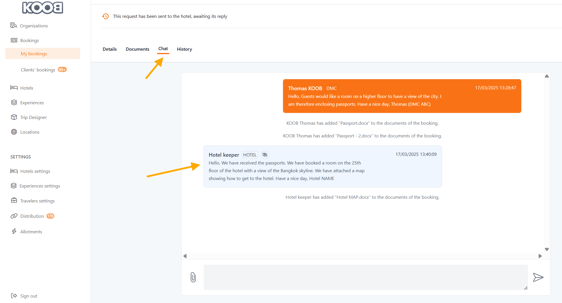
- The hotel can respond and send documents back to the DMC.
- You receive an email notification.
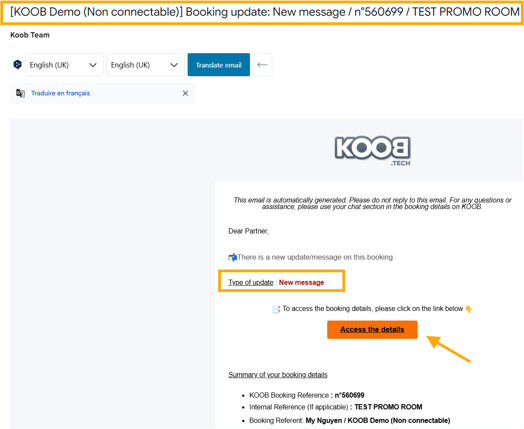
- Click on the link on the email notification to access the booking.
- Attached documents can be found in the Documents section of booking details. You can download them by clicking on the download symbol.
📌 Notes : There are no limits on conversations or the number of documents attached.
Types of documents you can send:
✔ Guest lists (Excel or PDF format)
✔ Special requests (e.g., room setup instructions)
✔ Payment confirmations
✔ Booking vouchers
📌 Tip: Hotels can also send documents to you, such as invoices, updated confirmation letters, or check-in procedures.
Private vs. shared messaging (for TO My Clients bookings only)
- By default, messages and documents sent via KOOB are visible to both the hotel and the TO in TO bookings (not DMC bookings).
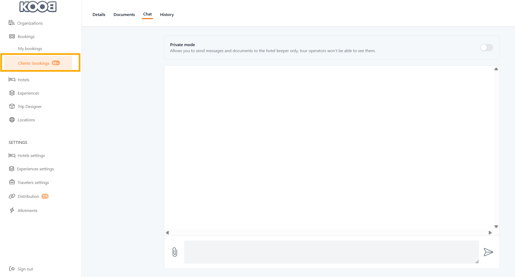
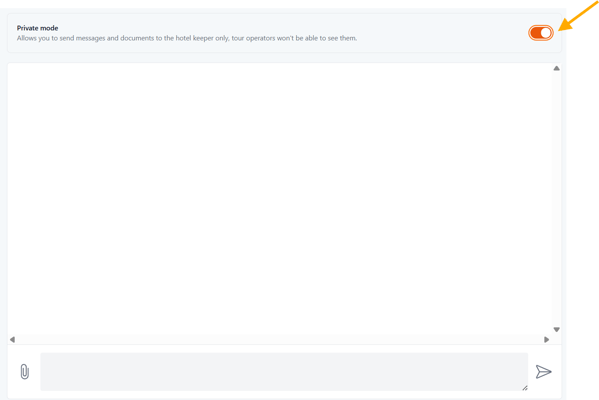
- If you want to send a private message to the hotel only (not visible to the TO):
- Click the "Private Mode" toggle before sending the message.
- The TO will not be notified, and only the hotel will see the message.
📌 Tip: Use private messages for sensitive discussions like special rates, internal arrangements, or confidential guest details.
Receiving and responding to hotel messages
How to know when a hotel responds?
📩 Email Notification → You will receive an email with a link to access the booking directly.
How to read & respond?
- Click on the link to be redirected to the related booking.
- Open the Chat tab.
- Read the hotel's response.
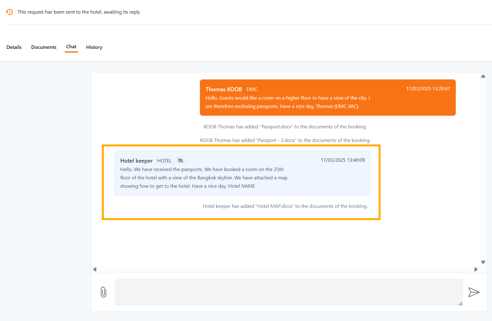
- Reply directly via the text box.
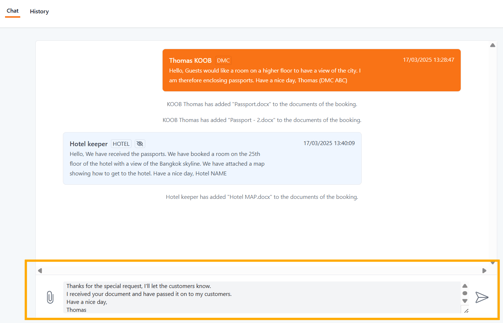
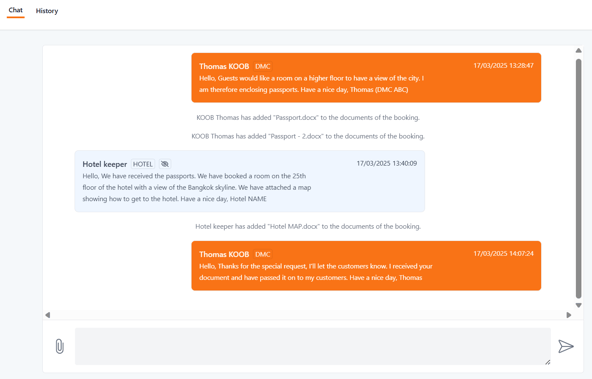
- Click "Send Message" to confirm.
📌 Tip: If the message requires an urgent response, contact the hotel by phone using the number displayed in the booking details.
Handling counter-proposals from hotels
If the hotel does not have availability for the originally requested booking, they may send a counter-proposal. In this case:
- The booking status changes to Pending in the dashboard.
- Open the booking details to view the hotel's message.
📌Read the full article here : How to handle counter-proposals from hotels ?
Escalating urgent requests
If a hotel does not respond to an important request (e.g., urgent booking confirmation or cancellation):
- Send a follow-up message in Chat.
- Call the hotel using the contact information provided in the Hotel Details section.
- If no response is received, consider alternative options or notify the TO about the delay.
📌 Tip: For high-priority bookings, always communicate changes in writing via KOOB chat to maintain a documented record.
Tracking message history
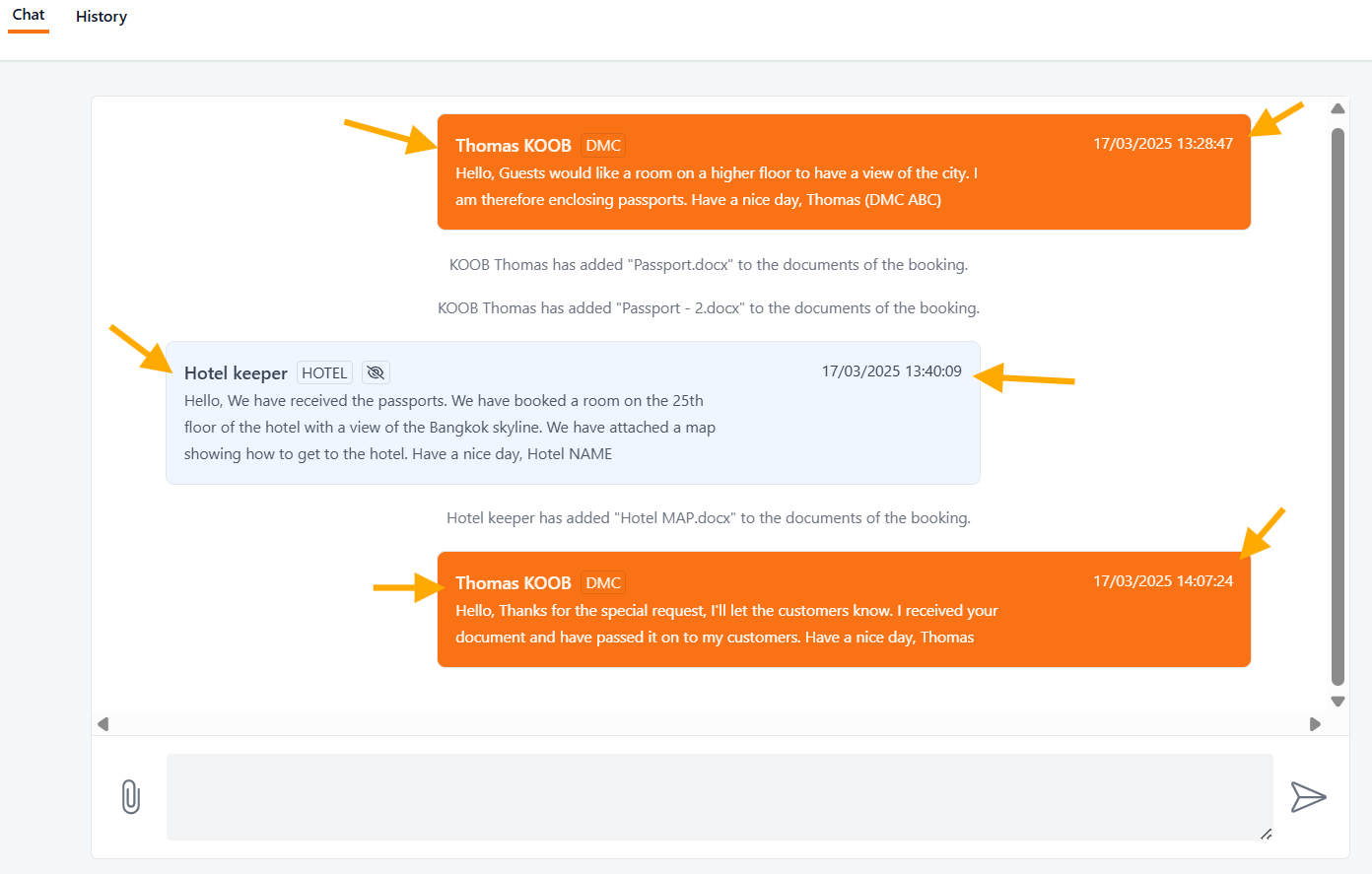
All interactions with the hotel are stored in the Chat History of the booking.
How to access message history?
- Open the Chat tab in the booking details.
- Scroll through the conversation to see all past messages.
- Messages are timestamped and include sender information.
📌 Tip: Keeping message records helps in case of disputes or clarifications regarding booking modifications.
Takeaways
✅ Instant Messaging & Document Sharing → No need for external emails.
✅ Real-time Notifications → Get alerts when hotels respond.
✅ Organized Communication → Keep all messages linked to specific bookings.
✅ Private Messaging Options → Control who sees your messages.
✅ Tracking & History → Maintain a clear record of all interactions.
FAQ
Q: Can I send attachments like guest lists or vouchers to the hotel?
✅ Yes! Use the Documents tab in the booking details to upload and send files.
Q: Will the Tour Operator (TO) see my messages to the hotel?
✅ Yes, unless you enable Private Mode, which hides the message from the TO.
Q: How will I know when a hotel responds to my message?
✅ KOOB sends email notifications, and you can check the Chat tab in the booking details.
Q: Can I retrieve past messages and hotel responses?
✅ Yes! The Chat History stores all interactions linked to a booking.
Q: What should I do if a hotel does not respond to my booking request?
✅ Follow up via Chat, call the hotel, and if necessary, consider alternative accommodations.
Related Articles
📌 How to update a hotel booking as a DMC?
📌 How to cancel a hotel booking as a DMC?
📌 How to handle counter-proposals from hotels?
📌 Need help? Visit our KOOB Knowledge Base or contact KOOB Support for assistance. 🚀