
✅ Light updates → No impact on availability, no hotel reconfirmation
✅ Important updates → Affect the stay; hotel reconfirmation may be required
✅ Automatic notifications → Hotels and TOs are informed in real-time
🚀 Objective: Ensure accurate and traceable hotel booking updates with clear communication across all stakeholders.
Light updates (non-critical modifications)
These changes do not affect hotel availability or pricing, and do not require hotel reconfirmation.
- Editable fields without reconfirmation:
-
Guest names
-
Guest nationalities
-
Guest date of birth
-
Notes to the hotel
-
- Steps:
-
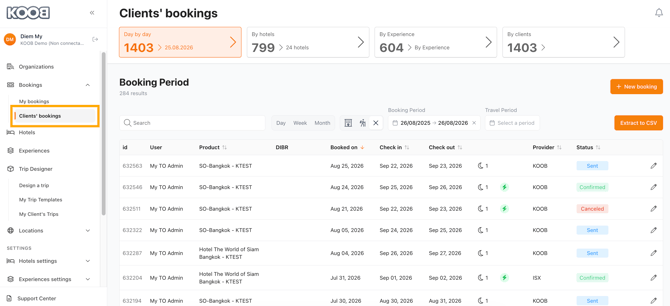
Go to “Clients Bookings” in KOOB
-
-
-
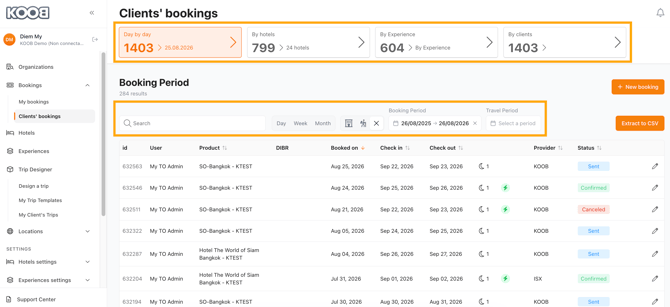
Use filters to find the TO’s booking
-
-
-
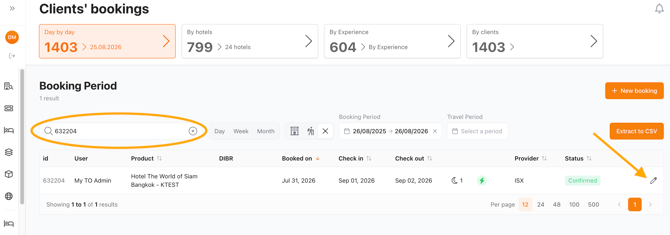
Click the ✏️ pencil icon to access the Booking Details
-
-
-
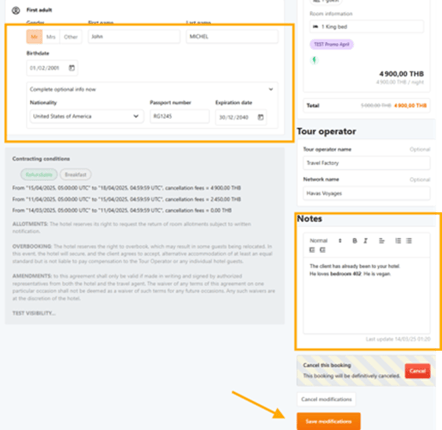
Update the necessary guest fields
-
Click "Save modifications"
-
💡 Tip: KOOB automatically sends a notification email to the hotel for traceability.
Important booking updates (modifications impacting the stay)
These changes affect hotel availability and pricing, and must go through hotel reconfirmation.
- Fields requiring reconfirmation:
-
Check-in / Check-out dates
-
Stay duration
-
Number of guests
-
Room category/type
-
Supplements or promotions
-
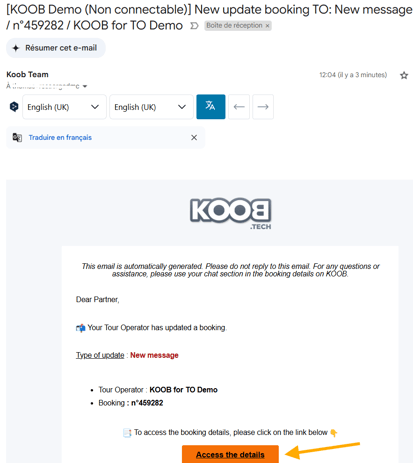
Example : The TO asks you to make a major change to one of its bookings.
Steps:
- Click on the button "Access to the details" in the email received.
-
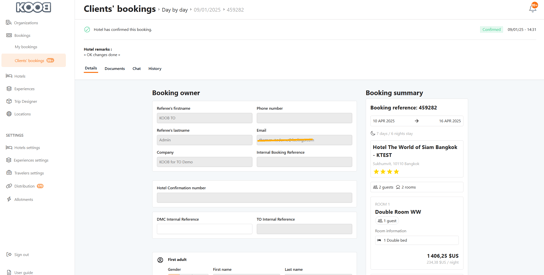
You are redirected to the related Booking.
-
Click the "Chat" section
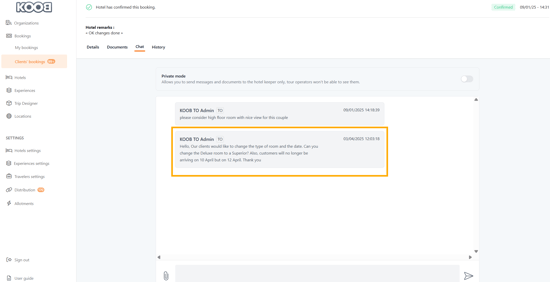
In this example TO is asking :
| Hello, Our clients would like to change their room type and date. Can you change the Deluxe room to a Superior? Also, guests will no longer be arriving on 10 April but on 12 April. Thank you |
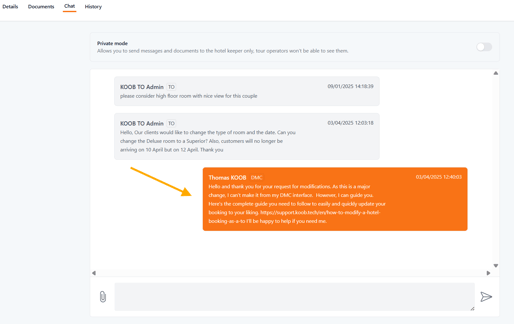
📌 You can't do the Important booking update for the TOs, but you can answer their questions and guide them through the process.
You can answer that:
|
Hello and thank you for your request for modifications. As this is a major change, I can't make it from my DMC interface.
|
🏨 Hotel reconfirmation process
| Status | Description |
|---|---|
| ✅ Accept | The hotel confirms the new booking details |
| ❌ Decline | The update is refused – booking must be recreated manually |
| 🔄 Counter-Propose | The hotel suggests a modification – DMC must validate it |
📌 If the hotel declines, the original booking is not reinstated. You must manually make a new reservation if needed.
💡 Tip: If the TO requests a hotel change, cancel the booking and create a new one in KOOB.
Tracking booking modifications
You can view the update history in the “History” tab of each booking.
| Message | Meaning |
|---|---|
| “Booking has been updated” | A light update (e.g. guest name) was made |
| “Booking has been replaced” | An important change was made and confirmed |
| “Booking has been confirmed” | The booking has been successfully confirmed |
🚀 Next Step: If changes are not accepted by the hotel, cancel the existing booking and initiate a new one.
Takeaways
✅ Light updates (guest info) can be made without hotel reconfirmation
✅ Important updates (dates, pax, rooms) require hotel approval
✅ KOOB notifies the hotel automatically for any updates
✅ Original bookings are not preserved after declined updates
✅ All changes are tracked in the booking’s history tab
FAQ
Q: Will the hotel see updates immediately?
✅ Yes. KOOB sends real-time notifications to the hotel for both light and critical updates.
Q: Can I undo a declined booking update?
❌ No. You must cancel and create a new booking if the hotel declines your update.
Q: Will the TO be notified of the changes?
📧 Yes. The Tour Operator receives notifications for all critical changes.
Related articles
- What are the different types of hotel bookings and availability on KOOB?
- How to communicate with hotels regarding a booking?
- How to handle counter-proposals from hotels ?
- How to update a Hotel booking as a DMC?
- How to cancel a hotel booking as a DMC ?
- How to track booking statuses and history ?
📌 Need help? Visit the KOOB Knowledge Base or contact KOOB Support 🚀